
Sheet metal feature
Sheet metal design is widely used across Malaysia, particularly among customers producing circuit boxes, CPU casings, electrical enclosures, and metal housings that require bending and folding processes.
The design process differs slightly from conventional modelling. Instead of creating a 3D model purely from a 2D sketch, the Sheet Metal environment in SOLIDWORKS allows users to build parts based on manufacturing parameters from the outset. The feature creates the metal part directly from defined edges while considering thickness and bend conditions.
When the correct parameters are set, such as sheet thickness, bend radius, and corner treatment, designers can generate accurate bends and realistic flange corners. This ensures the model reflects real fabrication outcomes.
To activate the Sheet Metal feature in SOLIDWORKS, simply access it from the Features Command Manager. The dedicated tools make sheet metal design straightforward and efficient to learn.
Sheet metal in SOLIDWORKS enables users to create models with accurate bend corners using industry standards.
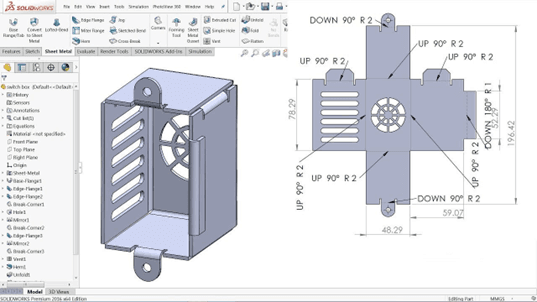
Sheet metal in SOLIDWORKS, able to create the model with bend corners.
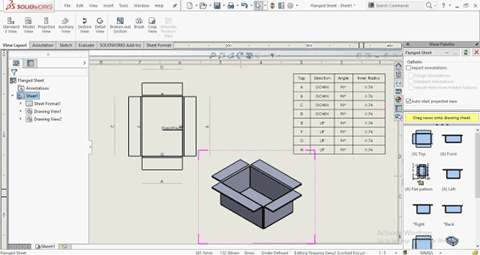
Dedicated features for sheet metal design in SOLIDWORKS, quick and easy to pick up.
Flange feature
Before starting a sheet metal design, it is important to understand how a sheet metal box is created. Every sheet metal model begins with a base plate. This represents a flat sheet of metal before any bending process.
Step 1. Create the Base Flange
Begin by sketching your desired profile and defining the appropriate parameters, including:
- Sheet thickness
- Bend radius
- Sheet metal standard
- Corner treatment type
This step establishes the design rules that control how the sheet behaves during bending.
Step 2. Apply Flanges
Once the base flange is created, you can apply additional features such as:
- Edge Flange
- Miter Flange
These tools allow you to create bends along selected edges. Because the bend radius was defined earlier, SOLIDWORKS automatically generates accurate bend corners. This enables designers to visualise the final metal box clearly before fabrication.
The customisation capability of the flange feature also allows users to modify flange profiles according to design requirements. It is a quick and efficient method to complete sheet metal models.
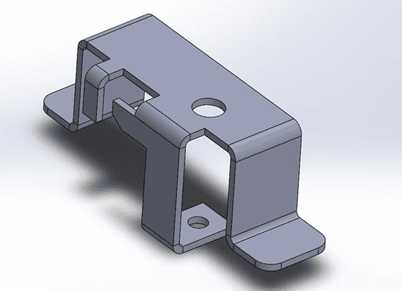
The customisation capability of the flange allows users to customise the profile of the flange.
Flatten View
Another essential feature in SOLIDWORKS Sheet Metal is the Flatten function. This feature allows users to view the model in its flattened state.
Why is this important?
The flattened view enables users to:
- Determine the cutting perimeter of the metal sheet
- Identify folded sections
- Review bend allowance and bend location
This information is crucial when preparing parts for laser cutting or CNC punching. The bend preview helps designers communicate clearly with fabricators, ensuring the plate is cut and folded according to design specifications.
If the flattened model appears too large or exceeds machine limits, adjustments can be made before issuing drawings for production. This helps prevent manufacturing errors and material waste.
The flattened view also ensures that the plate can be processed within the machine’s cutting range.
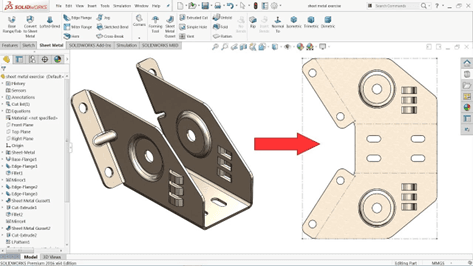
The flatten view allows users to check on the perimeter of the design and visualise how the plate looks like after the modification.
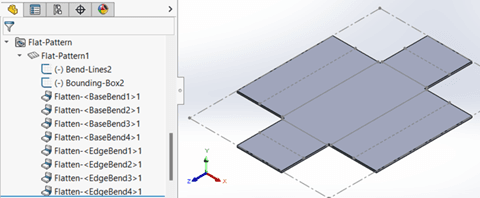
The flattened view is also used to view the plate, to ensure it can be cut within their machine cutting range.
Hole-Table
What is a Hole Table?
In technical drawings, a BOM is commonly included. However, the Hole Table in SOLIDWORKS serves a different purpose.
A Hole Table automatically generates data based on the holes created in the sheet metal model. For example, if multiple punched holes are added, the Hole Table identifies:
- Hole standard
- Hole size and depth
- X and Y coordinates
- Hole tags
The tagging system functions similarly to item numbers in a BOM. It allows users to identify each hole and reference the appropriate tooling required.
While Smart Dimension can be used to define hole positions, the coordinate data in the Hole Table is particularly useful for CNC machines. The X and Y coordinates act as precise reference points for punching operations, ensuring positional accuracy during manufacturing.
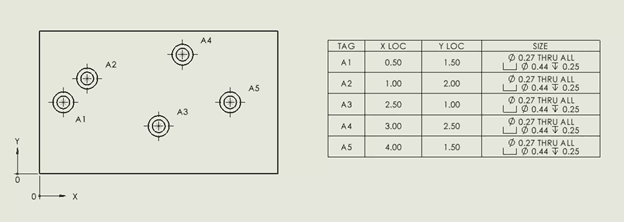
Hole table comes with the tagging for the hole, standard, depth and the coordinate.
The Sheet Metal feature is available in SOLIDWORKS Standard, Professional, and Premium packages. It is one of the core modelling tools designed to enhance efficiency, accuracy, and manufacturability in sheet metal design.
To explore SOLIDWORKS Sheet Metal features in greater detail, get in touch with us to join our hands-on workshop or arrange customised training tailored specifically for your sheet metal applications.
Email: sales@cadcam.com.my
WhatsApp: https://wa.link/0jj9tc
See you on the next blog post!
– Chai Chia Hin, Henry,
Senior Solution Advisor