

Save Time and Money with Virtual Commisioning
Emulate 3D
Emulate3D is an industry leading technology company and developer of the cutting edge Demo3D, Sim3D and Emulate3D Controls Testing software products.
It began operation in 2005 and is recognised as a market leader for world class visualization, simulation and emulation software across the automation industry.
The software technology has a proven track record across an extensive range of industry sectors including Automotive, Logistics & Warehousing, Airports & Baggage Handling, Robotics, Automation & Materials handling as well as diverse Manufacturing process’s.
Emulate3D has developed a successful relationship with many automation integrators and PLC developers as well as CAD software providers.

Emulate3D develops Dynamic Digital Twin software for virtual commissioning, throughput simulation, and industrial demonstration
Emulate3D Controls Testing & Emulate3D Ultimate are industry leading 3D emulation software tools used across an extensive range of industry sectors. The software is designed for testing your PLC logic not only before you need to go onsite, but before any mechanical or manufacturing process begin.
TEST AND DEBUG YOUR CONTROL SYSTEM OFFLINE
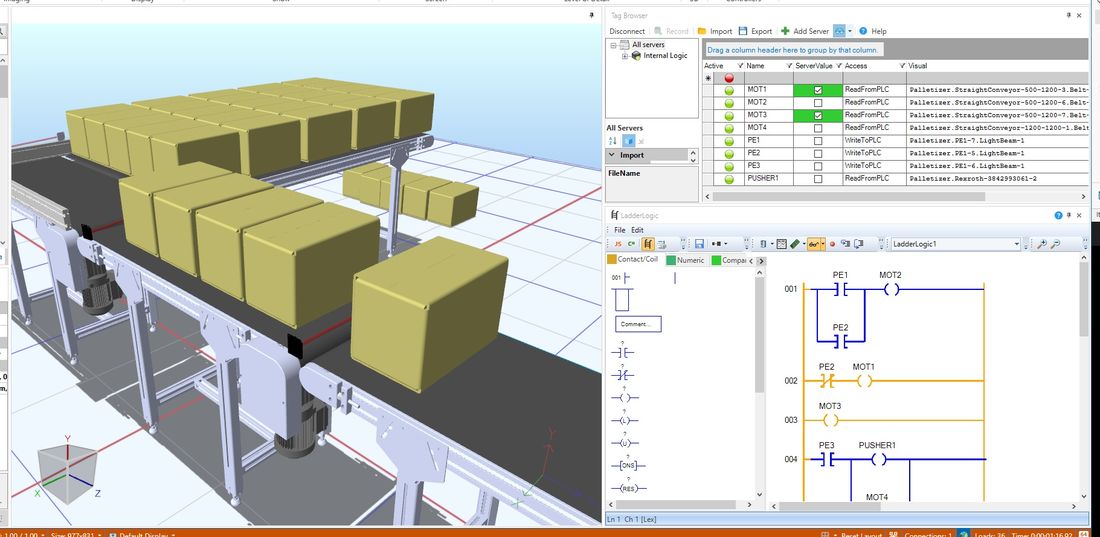
Emulate3D Controls Testing software enables you to test and debug yourcontrol system offline, before the real equipment is built, and without disrupting existing production.
Take logical testing off your automation project’s critical path and work efficiently in parallel with the system build and installation.
Reduce commissioning time and costs, and speed your time to market by running logic tests onyour system’s digital twin in a safe and controlled virtual environment before going on site.
EMULATE3D IS A HIGH VALUE, COST EFFECTIVE, WORLD CLASS INDUSTRIAL SOFTWARE TECHNOLOGY
- Flexible and easy to use physics based PLC Virtual Controls Testing tool used for designing, simulating and emulating industrial processes.
- Specialized technology for the development of Dynamic Digital Twin’s of a machine or system to test and debug the control system under realistic operating conditions
- A software solution utilized by a diverse group of automation integrators, OEM’s, end users & engineering solution providers globally.
EMULATE3D ALLOWS YOU TO START CONTROLS TESTING EARLIER IN THE PROJECT TIMELINE

- Test with fully reproducable load sequences
- Reduce on-site debugging time, reduce duration variability
- Produce more fully-tested and robust solutions
- Train operators safely on normal operations and fault recovery sequences
HIGH LEVEL EMULATION
Emulate3D Controls Testing models are Digital Twins that connect natively to a wide range of PLCs, and can be connected to other manufacturers’ products via a wide range of industrial standard protocols.
The Emulate3D framework also facilitates robust connections to WMS, WCS, and ERP systems for High Level Emulation.
INVITE YOUR CLIENTS TO JOIN THE VR EXPERIENCE

- View, control, and demonstrate your machine within a virtual reality (VR) environment for maximum impact.
- Invite your clients to join the VR experience by logging in to your model remotely, so you can discuss the latest project changes.
- With Emulate3D technology, meetings can be spontaneous, more frequent, and with practically no carbon footprint.
Emulate3D’s CAD Is The Model software technology is a unique PLC Controls Testing tool that allows users to create Virtual Commissioning Models directly in the CAD Environment. Globally recognised, the integration with existing CAD packages is what makes Emulate3D’s CITM offering unique and so powerful.
CITM provides the link between a mechanical CAD design and the electronic process control of a PLC way back at the design phase. This provides a platform where controls testing can occur earlier and prior to any physical manufacturing.
DESIGN YOUR MACHINE WITHIN YOUR FAMILIAR CAD SYSTEM
Emulation for Machine Builders technology is based on the “CAD is the model” concept which enables you to design your machine within your familiar CAD system. Emulate3D’s Add-in makes it straightforward to create a running controls testing model with your standard CAD control elements such as sensors, conveyors, pushers, and other mechanisms.
CREATE A VALUABLE TESTBED IN THE FORM OF A DYNAMIC DIGITAL TWIN
CAD Is The Model, commonly called Emulate3D for Machine Builders, helps users create controls testing models of a wide range of machine types, directly within your chosen CAD package. In fact CITM can be used for anything mechanical that may be automated!
Debug and refine the kinematic sequences and timing of your designs in a virtual environment, and make changes to them faster than is possible with physical prototypes.
Create your machine or mechanical system in CAD, mark up the various kinematic and control elements, then connect the control and activation elements to the PLC IO and run the emulation model.
By combining mechanical CAD information with real control system logic you can create a valuable testbed in the form of a Dynamic Digital Twin
CAD IS THE MODEL IS DESIGNED TO BE A PROCESS THAT FITS EASILY WITH YOUR EXISTING WORKFLOW – IT IS ADDITIVE RATHER THAN INTRUSIVE.
Emulate3D Controls Testing for Machine Builders software enables you to test out and debug your machine controls before the machine is built, by automatically connecting the PLC to your CAD model.
Reduce your time to market and cut development costs by running logic tests and carrying out design changes on your machine’s digital twin in a safe virtual environment before building a physical prototype.
Emulate3D products are designed to make you more competitive, saving you time and money.
VR is Here, Now! – Demo3DVR for CAD
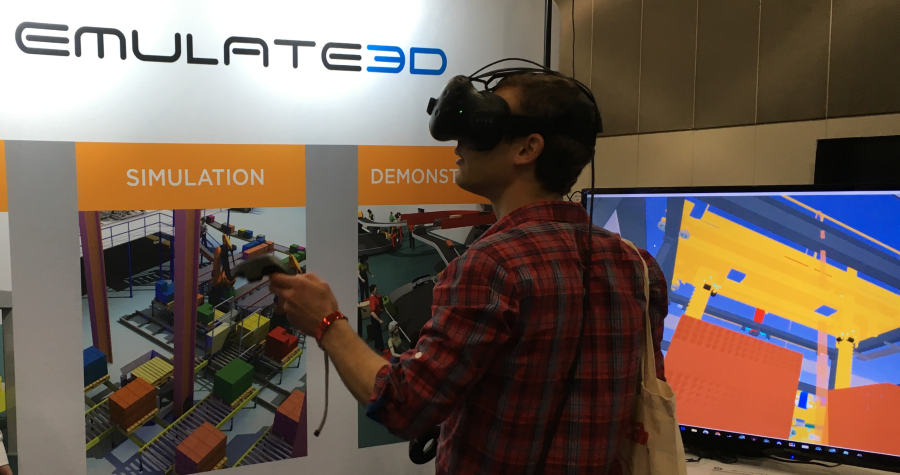
Demo3DVR is an add-in which enables you to view your CAD in the virtual world of the HTC Vive, Oculus Rift, or any Microsoft standard XR headset at the click of a button. Use the controllers to teleport around inside your system models, and to manipulate objects within the model. Teleport to any horizontal surface to see the model from different perspectives. Carry out modifications within your CAD environment, then click the VR button again to refresh the virtual world. Use the add-in to save your CAD to Emulate3D’s RAW3D format and view it in stereo 3D on your smartphone using Emulate3D’s free VR viewer.
- Demo3DVR for CAD is a standalone add-in
- Installs easily and creates a VR button in the CAD system menu
- Click on the VR button to activate the Virtual Reality headset
- Teleport around inside your CAD layouts using Vive, Rift, or Microsoft MR Controllers
- Teleport to and from any roughly horizontal surface (+/- 10 degrees)
- Manipulate CAD objects within the viewer using the controllers
- “Icepick” climb around larger CAD objects using the controllers
- Make changes in your CAD, click on the VR button to refresh the Virtual Reality view
- Save your CAD to RAW3D and email it to your clients to view on the free Emulate3D smartphone viewer
HOW CAN EMULATE3D TECHNOLOGY HELP YOU?

Please provide your details and our expert will contact you to discuss:
Product Pricing
License Options
Product Demonstration
Subscriptions and Maintenance