
Drawing Enhancements 2026 are here to save the day. These small improvements can make a big difference to your SOLIDWORKS drawings. Stop wasting time and give them a try.
Enhancement 1- Auto Generate Drawing
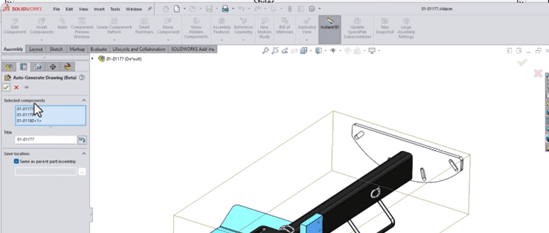
Users can now generate standard 3-view drawings without pre-creating template drawings. Previously, automating drawing generation required presetting drawing views within a template, which was repetitive and time-consuming. You also had to import the CAD model into the drawing sheet manually.
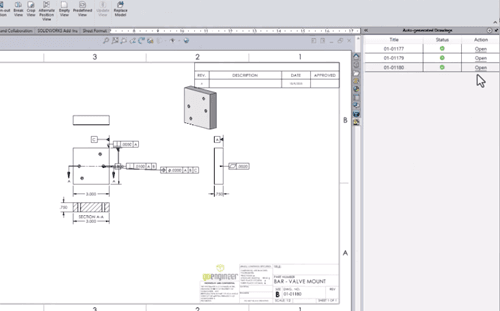
In 2026, SOLIDWORKS Drawing comes with this feature built-in. You simply select a part from the assembly, and SOLIDWORKS will automatically generate a standard 3-view drawing without needing a preset template.
The generated drawing is equivalent to one created manually. You can still create section views, rotate the drawing, and use Model View to automatically generate dimensions and hole callouts.
This enhancement saves a significant amount of time, especially when working with assemblies containing hundreds of parts. Once generated, you can further refine the drawing by adding detailed information and adjustments, completing it in no time.
Enhancement 2 –Dimension Line Break
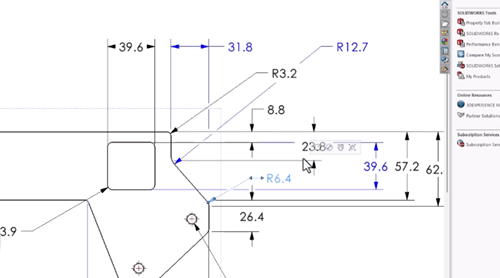
Dimension lines can become cluttered when multiple dimensions are applied, especially in complex CAD models where critical dimensions must be included. Overlapping lines can cause confusion and make drawings harder to interpret.
To address this, SOLIDWORKS 2026 introduces the Dimension Line Break feature. This function automatically creates breaks where dimension lines overlap, allowing users to clearly distinguish between them and reducing the risk of misinterpretation during review.
Additionally, the break updates dynamically when dimensions are repositioned, ensuring clarity is maintained at all times.
Enhancement 3 – Magnetic Line
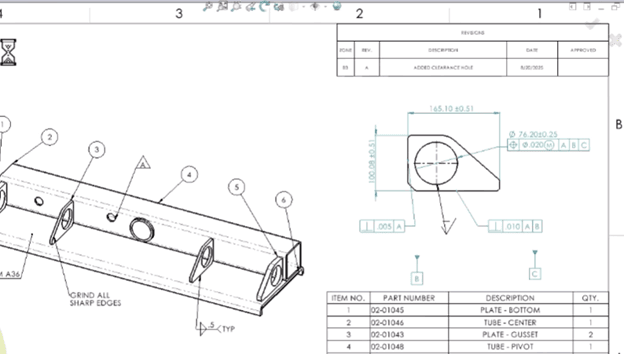
Magnetic Line now allows you to align balloons, dimensions, and symbols along a single line. This enables quick grouping and organisation of drawing elements with just a few clicks, improving both efficiency and visual clarity.
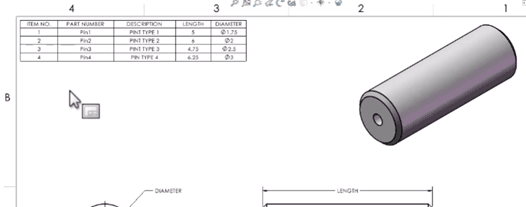
Enhancement 4 – Table for Configuration
Instead of manually creating custom tables to display configuration variants, SOLIDWORKS now includes a Family Table feature. This automatically generates a table listing all configuration variants within a part.
This reduces the risk of missing any variants and simplifies the management of configurations within your SOLIDWORKS part files.
If you are interested in exploring these new features, feel free to register for the What’s New in SOLIDWORKS Workshop. It’s free and available on selected dates. Stay tuned to our page for more updates. For more information or any enquiries, feel free to reach out:
Email: sales@cadcam.com.my
WhatsApp: https://wa.link/0jj9tc
We would be happy to assist you and answer any questions you may have. Looking forward to connecting with you.
See you in the next blog post.
– Chai Chia Hin, Henry
Senior Solution Advisor